Hey guys, we’ll be looking at fixing your problem in this video. We publish content twice a week. If you need help fixing a problem then you’ve come to the right place. Be sure to like and subscribe and hit the notification bell so you’ll know when new content comes out. You know, sometimes life can be rough and it can be hard to figure out how to fix your own problems. It can be a big help to have someone to talk to. I know I’ve had times when I just needed someone to listen to. Well, good news guys! BetterHelp is here for your. Sign up for BetterHelp today. Use the link below to get 20% off your first session…
Gawd I hate video tutorials.
What about someone who mumbles and has music cranked to 11 so you can’t even hear what they are saying?
It’s done to pad out the time before you leave the video, because you have to be watching for a certain length of time before it’s considered “watched” for monetisation purposes.
And the comments are all like: ”You’re my savior! This was the only solution that actually worked for me!”
This was the only solution that actually worked for me!
Every time you find a solution, it’s ‘the only solution that actually worked’ for you. Why would you keep trying different solutions after you already found one that worked?
See also: “It’s always in the last place you look.”
Wait fuck this is true haha
On a couple of occasions, after finding the missing item, I have continued to search even though it has been found. Because absolutes are wrong, and I’m here to prove it.
If a solution seems off despite fixing the issue, I will absolutely continue looking for alternative solutions. I suppose it depends on if you’re more interested in the answer than the fix.
With blender, it’s “next. choose Clip Offset Settings under the View menu” and I have 6 View menus, none of which has anything with that name. Then I find out it was all changed in some previous version.
Flip Normals has changed names so many times in the past decade that I have no idea what it’s called today or what it was called before and I’m starting to suspect it’s in the witness protection agency.
I feel bad for newcomers because you just have to use the Force a lot of times when using Blender.
Also, I was once following a laptop disassembly video step by step. Half-way through, he stops and turns the laptop over several times in confusion. He was just winging it for the video.
I forgot where I got this, but it is from fediverse

Steve Catrell, attourney at law
I had half a donut and was progressing in harmony. Then, everything changed when the update nation attacked.
Always always check what version of blender the tutorial is for! Later versions have automated and fixed so much annoying shit that you had to do/fix manually in older versions. Blender 5.1 is way different to 2.8! Also it doesn’t matter what menu it’s in because you can just search for that tool with the search function, bind it to spacebar.
Blender is actually amazing now (>5.0) and I feel like lots of people tried 2.8 and got scared because it was janky and it turned them off Blender forever.
Thanks for the tips! I mostly use it for occasional video editing, so never take time to really get to know it.
Searching sounds really useful.
Thanks for the tips! I mostly use it for occasional video editing, so never take time to really get to know it.
Searching sounds really useful for my situation!
Patch notes: Removed button that fixes issue.
Oh come on. There’s not 5 minutes of introduction and 3 of ads.
The tutorial is 10:03 in length so they can hit that monetization
“And today’s 10 seconds of content is brought to you by BlahblahVPN. Let’s talk about them for 8 minutes…”
And a 10 second intro
“Want to configure the program to run? Just go to this directory and edit this text file!”
Looks inside
No file or directory exists.
Often, in that case, you need to create that directory and that text file.
cd vs mkdir makes a big difference when a beginner follows a tutorial IMHO.
In Linux, this is the pain of multiple installation methods.
My regretful condolences go out to anyone that installed Steam as a flatpak.
Every god damn time…
fr, every, every goddamn fucking time…
Must be a Microsoft product.
I saw the start menu. It’s definitely the search indexing on windows. That’s been broken since like Windows 10.
If you search for something and it doesn’t show up, you can do a bunch of troubleshooting and reseting or you can download a launcher like microsoft power toys > power run.
btw my OS died last week so now I’m officially on arch linux 😎
Me every two years I try to do more than adjust transparency in gimp
You ain’t even getting it doing that. There’s been a bug since 2.10 with transparency. Export anything and you get a crushed alpha channel. Import it into anything else and the alpha looks crazy high contrast. Import it into GIMP again and the contrast is normal, but the channel is still crushed, so it’s banded as fuck.
They say it’s intended behavior, which would make sense if GIMP was a dedicated image corruptor.
Gnu Image Mangling Program
!memes@lemmy.world Sorry, what are you people talking about? I have precisely this GIMP version (to be exact, 2.10.28, in a very out-of-date Linux setup) and I never experienced problems with transparency/alpha channel. And I’ve been using GIMP since… I dunno, 2019?, even earlier, when I started to become accustomed to GIMP… I mean, I guess y’all talking about exporting a PNG file from GIMP, right? Or are y’all actually talking about other image formats?
Someone posted it to their bug tracker forever ago, with images, but they changed the name to some random unrelated feature request and now I can’t find it. Did find this Bluesky post about it, though:
https://bsky.app/profile/paynamia.bsky.social/post/3kt6odnfbcc2i
!memes@lemmy.world Oh… Thanks, now I see it. I just did a quick test (comparison screenshots embedded in this reply), trying to imitate as much as possible from that Bluesky post (RGB 8-bit gamma integer, sRGB, background layer was deleted, an image with a smaller size was pasted to the canvas, a manual mask was added to the pasted layer) and, yeah, I was able to reproduce this problem here: if the alpha value is low enough, it either ends up truncating to zero, otherwise it gets reduced to a lower value; higher values are seemingly unaffected. The problem also happens with other transparency-able formats such as WEBP.
However… based on what I barely know about image file formats and color theory, I’d say it seems something to do with the color profile, as color profiles are responsible for gamma adjustment (and this ends up including the alpha channel as well). The very name of the GIMP’s native color profile says it all: “Perceptual” sRGB, this means it’s adjusting the values to account for human perception, akin to how audio files (MP3, to be exact) truncate everything below somewhere around 60Hz and above somewhere around 15 kHz (the frequency range for average humans). Even though PNG is meant to be lossless, a color profile is inherently a lossy thing, because human perception is a lossy thing, which certain color profiles try to imitate, especially “Perceptual” ones.
I didn’t test the same GIMP behavior with other color profiles, though.
To be clear: I’m not talking about the “Export color profile” option one can choose during exporting, I’m talking about the color profile used when a new image is created and edited in GIMP. Really, this “color profile” thing is very important to a picture (esp. photographs) yet it’s so complicated that even image editing software developers are likely to struggle with it…
Not to mention how it is kinda related to hardware too, despite the dismissal from Paynamia; to be exact, it has to do with the graphics peripheral, the LCD/LED/etc monitor/TV, as every monitor/TV can and will have different manners to display images; the color profile mainly tries to compensate for an expected monitor (which, in turn, tries to compensate for human perception), but it’ll compute new values for the pixels to be saved in the file so the final picture matches the color profile but will likely lose the original precision.
I wonder how I never noticed this, even though I deal with transparent PNGs a lot, maybe I didn’t have to use very low alpha values before.
As for the screenshot below, a triangular chunk of green background next to her (Lesser Horned Owl, Macaulay Library ML379762121) ear-tufts is missing from the PNG. Funny thing I used GIMP to do this side-by-side comparison regarding the GIMP’s problem, lol.
(I’m aware I’m doing a deeply-technical reply in a meme community but I can’t help myself but to be nerdy and verbose)
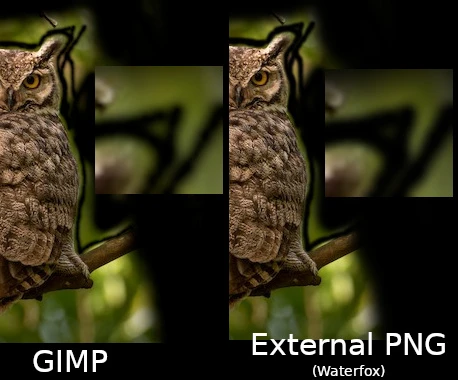
To be fair, I didn’t notice it and start digging looking up information about it until I was working on a mod for Half-Life (usually my profile pic, but I think I don’t have it here), and needed to be able to create an extremely specific alpha channel for the phong mask.
Iirc, I experimented with the color profile settings and got no difference. I will say that I can’t seem to reproduce what I was saying about the banding now. For a short while after 3’s release, I was getting major banding in the alpha channel, but now I’m not.
You think GIMP is your ally? I was born in it, learned to image edit on it. I didn’t touch Photoshop until I was already a man.
(Seriously, though, once you actually get into GIMP and learn it well, it works pretty great. I struggle trying to use anything else.)
don’t forget the shitty microsoft word animation introduction that takes up like 2 minutes
This is linux times ten. I use it all the time, but as soon as you have a problem even remotely outside the norm you’re screwed unless you’re steeped in knowledge for the particular distro you work with. Your quest for an answer will result in: 2-3 other people with the same question, but no responses. A half dozen answers for your problem yet a distro version for which the answer no longer works. A couple lengthy, well-thought out answers that require multiple terminal entries and dependency installations yet still doesn’t work after carefully following the instructions.
./configure not found.
Installs configure.
Still doesn’t work.
Anyway, lol, as much as I like linux and have a crapload of instances running, it sure is a pain in the ass.
Yeah, been fighting something on mine for a few weeks now.
Search issue - Add this line to the config file
Adds line to file, nothing changes, Google more - sometimes you also have to add this and this (doesn’t explain why only sometimes)
Adds this and this. Fixes problem while it’s booting but then goes back to being fucked when the frontend launches
Googles more - only other solution I can find I can’t do because my hardware doesn’t support it.
Problems like that are incredibly frustrating. What entries you make look right, but somehow the result is wrong. I usually just assume somewhere along the way the authors of the instructions forgot something incredibly basic like permissions. Because they have their system set up so that they already have them set for their user or something so they don’t have to enter them every time they work on something, so they never think about it and spell out those steps when writing help responses. While help is often well intentioned (and I always appreciate someone’s help) there’s always the opportunity for them to forget what they didn’t know at the most basic level.
It’s extra frustrating because I’ve gone to the actual documentation for those settings and even that is vague hell. Short of talking to the actual dude who programmed it (which admittedly is sometimes possible with FOSS) I don’t know where to go from here.
Been on linux full time for under a week, I’d say linux is more like.
“I have issue”
“Here’s 10 extremely techincal solutions that will take you hours to work through and may not work”
“I still have issue”
“Oh yeh there’s just a button you can press that fixes it instantly”On the bright side thats more my own lack of familiarity than anything and once an issue is fixed it stays fixed and generally works a lot more cleanly than if I had a similar issue on windows where fixes are always kind of cludgey.
“just watch my video to learn how to fix your problem of not being able to watch videos”
Hey does anybody else use the numpad to skip thru the vids and find what you’re looking for?
Every single time I need to look up something for Google products. This preceeds AI. Since the advent of AI it’s a gamble on whether a tutorial will actually match reality.
Skyrim gog lutris mods